Azure Lab Part 1: Tenant & Subscription Baseline
How I structured my personal Azure tenant, subscription, and roles to support both AZ-500 studying and a small forensics lab. Part 1
12/1/2025 • 2 min read
TL;DR — Simple Azure tenant + single subscription layout with two resource groups (
az500-study-rgandforensics-lab-rg) and scoped roles for two lab users. Designed to support AZ-500 study, forensics practice, and be easy to grow or tear down.
Azure Environment Structure (Current Notes)
I wanted a clean setup that works for both AZ-500 studying and building my forensics lab.
Here’s how I structured it so far and why:
Structure Overview
-
Tenant (Entra ID)
The root of everything. Users, groups, and directory-level roles live here. -
Subscription: Azure subscription 1
Single subscription for now (the free trial upgraded if needed). All resources will live inside this. -
Resource Groups
az500-study-rg→ For labs and exercises specific to AZ-500 material.forensics-lab-rg→ For my own sandbox to simulate incidents, collect evidence, and practice investigations.
-
Users
az500.user→ Analyst-style account for AZ-500 study.forensics.user→ Account to simulate analyst or attacker roles in the forensics lab.
-
Entra Roles (Tenant level)
Both users have:- Security Reader (see risky sign-ins, alerts)
- Reports Reader (view sign-in and audit logs)
-
Azure RBAC Roles (Subscription level)
Both users have:- Reader
- Log Analytics Reader
- Security Reader
Refresher:
- Tenant-level roles (Entra) → directory-wide, apply to all subscriptions under the tenant.
- RBAC roles (Azure) → scope-bound, apply only where you assign them (sub, RG, resource).
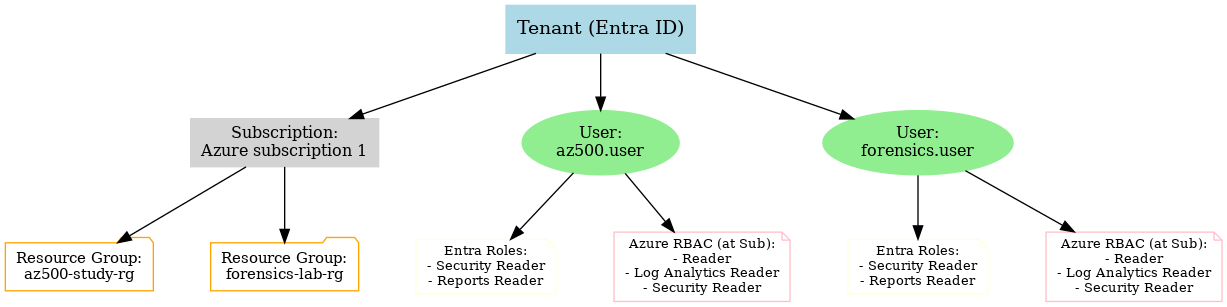
Diagram
Why Structure It This Way?
-
Separation of Concerns
Splitting resources into two groups (az500-study-rgandforensics-lab-rg) keeps experiments and study material clean. I can delete one RG without touching the other. -
Clarity for Roles
Assigning both Entra roles (identity-level visibility) and RBAC roles (resource-level visibility) makes test users realistic for security monitoring and forensics. -
Foundation for Growth
This structure scales easily. I can add more users, subscriptions, or resources without reworking the basics. -
Portfolio-Ready
The diagram helps me (and potentially employers) see that I understand Azure’s hierarchy: Tenant → Subscription → Resource Groups → Resources, with clear role assignments.
This is my baseline Azure environment setup before adding actual lab resources (VMs, storage accounts, Log Analytics).
I'll expand this as I build the forensics side out (e.g., dedicated evidence storage, jump host, and simulated attacker/defender identities).
- Azure + Colima: Forensics Setup Notes with Cheat SheetNotes on how Azure (crime scene) and Colima/Docker (toolbox) fit together, plus a minimal cheat sheet for daily commands and setup patterns.